> ## Documentation Index
> Fetch the complete documentation index at: https://docs.supercycle.com/llms.txt
> Use this file to discover all available pages before exploring further.
# Start/end settings
> Manage how subscription billing starts, stops, and appears on your storefront.
Subscription billing settings are accessed from [Subscription settings](https://admin.shopify.com/apps/supercycle/settings/methods/subscription)
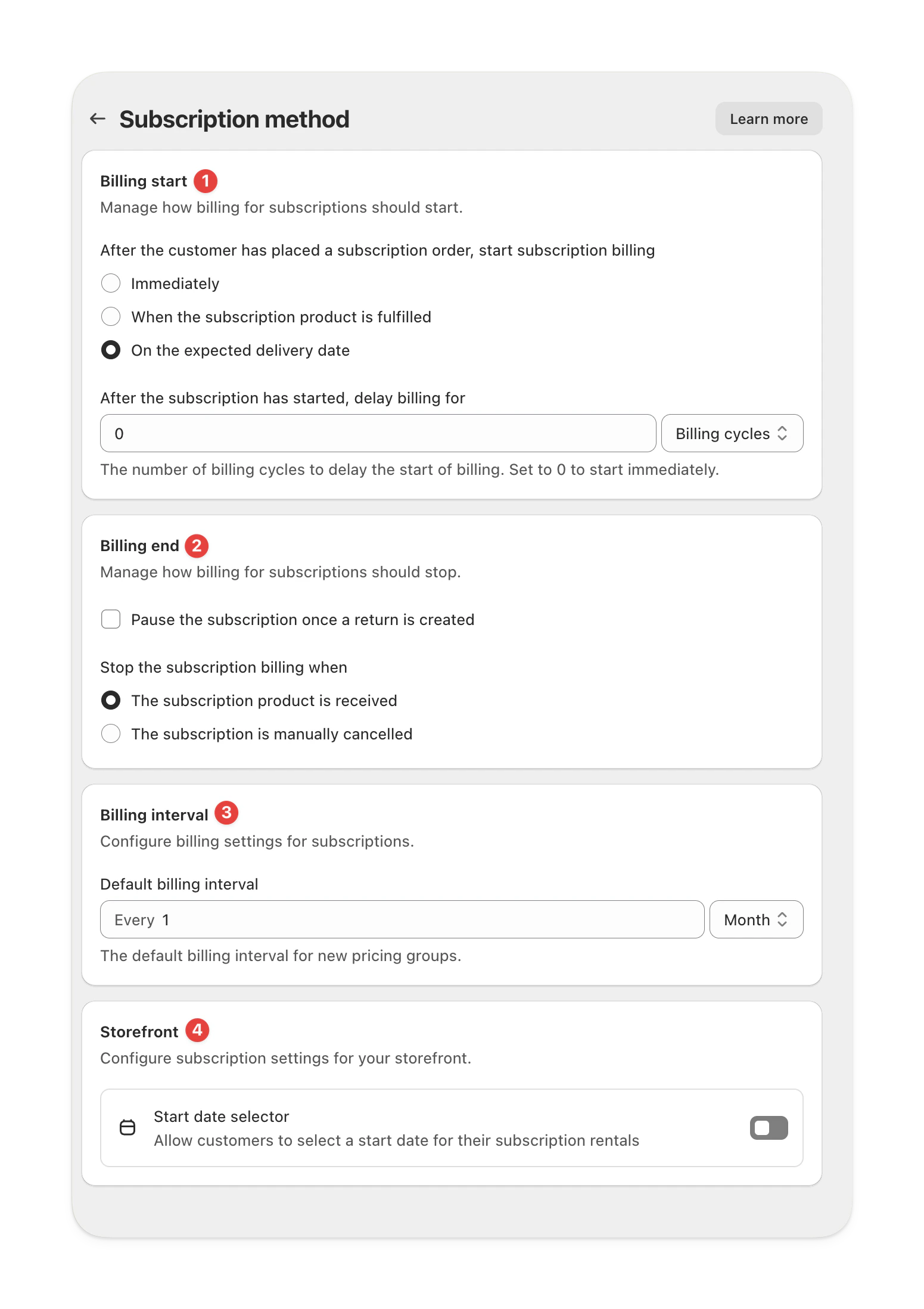 ***
## Billing start
Control when subscription billing begins after a customer places their order.
| Option | Description |
| ---------------------------------------------- | ---------------------------------------------------------- |
| **Immediately** | Billing starts as soon as the order is placed. |
| **When the subscription product is fulfilled** | Billing starts once the product is fulfilled in Shopify. |
| **On the expected delivery date** | Billing starts on the date the item is expected to arrive. |
You can also delay the start of billing by a set number of billing cycles.\
Set it to **0** to start billing right away.
### Delay billing for X cycles
Use this to control when the first recurring charge fires after the subscription starts. Set the value to skip cycles that have already been paid for at checkout.
| Value | When the first recurring charge fires |
| ----- | -------------------------------------------------------------------------------------------------------------------------------- |
| `0` | Immediately when the subscription start date is reached. Use this when checkout did not collect any subscription period upfront. |
| `1` | One billing cycle after the subscription start date. Use this when storefront checkout already covers the first cycle. |
| `2+` | Two or more cycles later. Use only when checkout covers more than one cycle. |
This setting is forward-only. Changing it does not retroactively update existing subscription contracts. If you change it, the next billing date on every existing subscriber must be updated manually for the new behavior to apply to them.
If your storefront price already covers the first cycle, set `Delay billing for` to `1` so recurring billing skips ahead by one cycle. Otherwise customers can be billed twice for the same period.
If you are unsure how your existing contracts are set up, contact support before changing this setting.
***
## Billing end
Choose when and how to stop billing for a subscription.
| Option | Description |
| -------------------------------------------------- | ---------------------------------------------------------------- |
| **Pause once a return is created** | Automatically pauses billing when a return is initiated. |
| **Stop when the subscription product is received** | Ends billing once the returned product is received and scanned. |
| **Stop when manually cancelled** | Keeps billing active until you cancel the subscription manually. |
***
## Billing interval
Define how often customers are billed while their subscription is active.
The default interval applies to all new pricing options, however can be customized per option.
| Example | Description |
| ------------------ | ------------------------------- |
| **Every 1 month** | Customers are billed monthly. |
| **Every 3 months** | Customers are billed quarterly. |
***
## Storefront settings
Control what customers can do on your storefront.
### Start date selector
Turn this on to let customers choose their subscription start date during checkout.\
This is useful for preorders or rentals starting at a future date.
***
## Billing start
Control when subscription billing begins after a customer places their order.
| Option | Description |
| ---------------------------------------------- | ---------------------------------------------------------- |
| **Immediately** | Billing starts as soon as the order is placed. |
| **When the subscription product is fulfilled** | Billing starts once the product is fulfilled in Shopify. |
| **On the expected delivery date** | Billing starts on the date the item is expected to arrive. |
You can also delay the start of billing by a set number of billing cycles.\
Set it to **0** to start billing right away.
### Delay billing for X cycles
Use this to control when the first recurring charge fires after the subscription starts. Set the value to skip cycles that have already been paid for at checkout.
| Value | When the first recurring charge fires |
| ----- | -------------------------------------------------------------------------------------------------------------------------------- |
| `0` | Immediately when the subscription start date is reached. Use this when checkout did not collect any subscription period upfront. |
| `1` | One billing cycle after the subscription start date. Use this when storefront checkout already covers the first cycle. |
| `2+` | Two or more cycles later. Use only when checkout covers more than one cycle. |
This setting is forward-only. Changing it does not retroactively update existing subscription contracts. If you change it, the next billing date on every existing subscriber must be updated manually for the new behavior to apply to them.
If your storefront price already covers the first cycle, set `Delay billing for` to `1` so recurring billing skips ahead by one cycle. Otherwise customers can be billed twice for the same period.
If you are unsure how your existing contracts are set up, contact support before changing this setting.
***
## Billing end
Choose when and how to stop billing for a subscription.
| Option | Description |
| -------------------------------------------------- | ---------------------------------------------------------------- |
| **Pause once a return is created** | Automatically pauses billing when a return is initiated. |
| **Stop when the subscription product is received** | Ends billing once the returned product is received and scanned. |
| **Stop when manually cancelled** | Keeps billing active until you cancel the subscription manually. |
***
## Billing interval
Define how often customers are billed while their subscription is active.
The default interval applies to all new pricing options, however can be customized per option.
| Example | Description |
| ------------------ | ------------------------------- |
| **Every 1 month** | Customers are billed monthly. |
| **Every 3 months** | Customers are billed quarterly. |
***
## Storefront settings
Control what customers can do on your storefront.
### Start date selector
Turn this on to let customers choose their subscription start date during checkout.\
This is useful for preorders or rentals starting at a future date.